Pingly — AI App for Your Inbox, Calendar & News

AI app for your inbox, calendar & news An app, that gets you.

Tell Pingly what matters, and it keeps you informed, organized and on track — all in one place.

No more picking up your phone to check one simple thing, only to end up jumping between five different apps — or forgetting why you opened it in the first place.

Download the app See in action
Rated 5.0 on the App Store
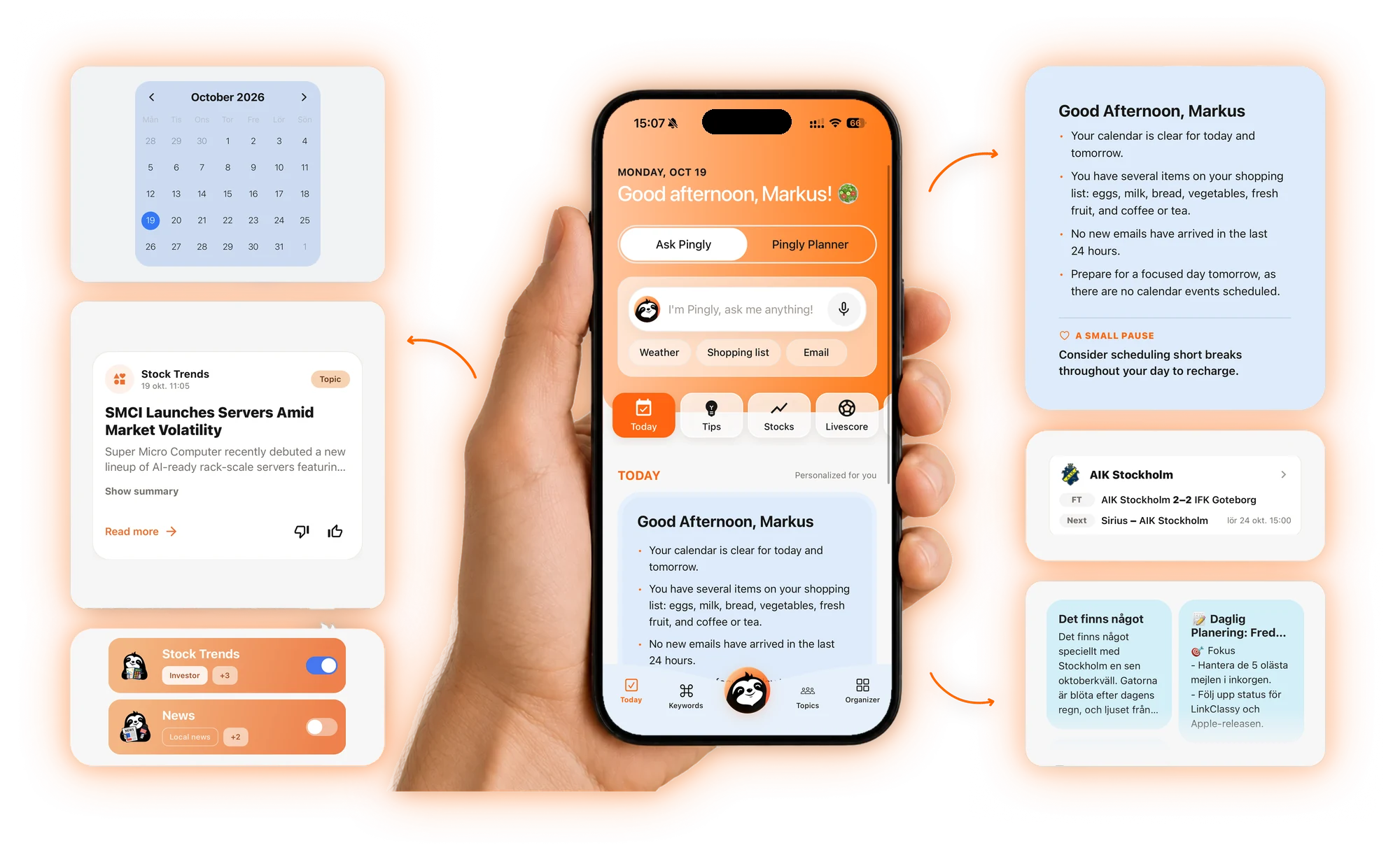
Pingly app in hand showing the Today view, surrounded by calendar, My World news, topics, daily brief, live scores and notes

Seven apps, one surface

Mail Calendar Notes Feed Stocks Live scores AI Threads → Pingly
How it works

How Pingly works: three steps to a calmer day

No setup marathon. Tell Pingly what matters and it takes it from there.

1

Download the app

Pingly is live on the App Store and Google Play. Try it free for 30 days.

2

Tell Pingly what matters

Connect your mail and calendar, add the topics and people you care about.

3

Get your calm daily surface

One distilled view of your day — no more jumping between seven apps.

Features

One app for mail, calendar, news, stocks and live scores

Your entire world

A clean daily overview of your most important updates, reminders, and insights.

All tasks in one place

Keep your calendar, notes, and emails organized in one simple place.

Custom topics

Follow the subjects you care about and stay updated without the noise.

Create keywords

Choose keywords that matter to you and get more relevant, personalized updates.

Stocks in real time

Follow your favorite stocks with real-time data, right next to the rest of your day.

Live scores

Follow your favorite teams and see the score as the match happens.

My World — news on the topics you follow Today — ask Pingly or plan your day
Modes

Chat mode. Utility mode.

Switch the entire interface with one tap — talk to Pingly when you want a conversation, or get the day laid out flat when you just need to move.

Utility mode

Your day laid out flat: top news, reminders and tasks in fixed, scannable blocks. Built for the morning rush.

  • Today's brief, reminders and news in one scroll
  • Fixed layout — nothing shifts while you're rushing
  • One tap back to Chat mode whenever you slow down

Chat mode

Talk to Pingly directly. Threads track people, companies and topics, and answer back like a calm assistant who already read your inbox.

  • Describe what matters — Pingly generates a live thread
  • Follow people, brands or markets without a search bar
  • Conversational, not transactional
Utility mode — Pingly Planner with your day in fixed, scannable blocks Chat mode — ask Pingly anything
Tour

Every surface, one feeling.

Swipe through Today, My World, calendar, live scores, notes and your topics, all cut from the same calm cloth.

Your digital journey starts here

Your digital journey starts here — Pingly app screens
Download on the App Store Get it on Google Play
Our prices

Pingly pricing: choose your plan

Find the level of calm that suits your day — from simple order to complete optimisation of your digital life.

Basic

For users looking to get started.

29 kr / month
  • Daily updates
  • Up to 5 topics/keywords
  • Connect 1 email account
  • Ads
  • 10 AI questions / day
Select plan

Platinum

For power users who want full access.

99 kr / month
  • Daily updates
  • Up to 18 topics/keywords
  • Connect 5 email accounts
  • No ads
  • 200 AI questions / day
Select plan
Frequently asked questions

Questions about Pingly

See all FAQs →

What is Pingly?

Pingly is an AI productivity app for iPhone and Android, built in Stockholm, Sweden. It brings your mail, calendar, notes, news on the topics you follow, stocks and live scores into one calm daily brief, and you can ask the built-in assistant about any of it in plain language. The app is available in English, Swedish and Spanish and is published by Pingly App Limited.

How is Pingly's Utility mode different from a regular calendar app?

A calendar app shows your meetings. Utility mode shows your whole day: an AI summary of what matters today, your calendar, reminders and shopping list, mail that needs attention, tips, stocks, live scores and news on your topics, laid out in the same fixed blocks every morning so nothing shifts around. Pingly doesn't replace your calendar; it reads your Google or iCloud calendar and puts it in context with everything else. When you'd rather talk than scan, one tap switches to Chat mode.

Can Pingly's AI read my email automatically?

Only if you connect an account, and only to help you. You choose whether to connect Gmail or Outlook (signed in securely via OAuth, so Pingly never sees your password) or iCloud Mail (via an app-specific password). Once connected, Pingly's AI reads message headers and snippets together with your calendar to write your daily brief and answer your questions. Google user data is never sold, never used for advertising and never used to train general AI models, and you can disconnect an account, or delete everything by deleting your account, at any time.

What does Pingly cost?

Every plan starts with a 30-day free trial. After that, Basic is 29 SEK, Premium 59 SEK and Platinum 99 SEK per month, billed monthly with no minimum contract.

Can I change my plan later?

Absolutely. You can upgrade or downgrade your plan at any time directly in settings, and it applies from your next billing cycle.

Is there a minimum contract period?

No. Pingly is billed monthly and you can cancel your subscription with one click, with no notice period.

Is my data secure?

We take privacy seriously. All data is encrypted in transit and at rest, and we never sell your information to third parties.

Which mode should I start in?

Utility mode if your mornings move fast; Chat mode if you'd rather just ask Pingly what's going on. You can switch any time with one tap.

Fewer apps. More focus.

Download Pingly and start sorting your digital life.

Download on the App Store Get it on Google Play
Rated 5.0 on the App Store